Paper Notes: [Operating Systems Review 2007] Autopilot: Automatic Data Center Management
This article outlines the design goals of Microsoft's Autopilot cluster management system, as well as its mechanisms for machine lifecycle management, applicat…
Autopilot is a cluster management system developed by Microsoft’s Bing team, and it has a history of nearly 20 years. Autopilot is a mature system with highly decoupled internal modules. Its design goal is to manage static clusters automatically. Automation provides the following benefits:
Saves labor
Responds faster and completes processing more quickly than manual handling
Provides an audit trail for every operation
Is less error-prone
Autopilot’s design relies on the following premise: the processes of running applications can be killed without advance notice, without affecting the stability of the overall system. This assumption is reasonable because the physical machines in use are commodity computers (as opposed to commercial high-reliability computers, supercomputers, and so on), which may fail at any time. Therefore, the cluster management system cannot guarantee that it will notify running processes before a node fails. The cluster management system mainly needs to consider the following three aspects:
Machine lifecycle management
Application lifecycle management
Matching the two
Matching Machine and Application Lifecycles
Autopilot is a static management system. The most important manifestation of this static nature is that machine and application lifecycles are statically bound. Autopilot first divides machines into different Machine types, which determines which applications are installed on each machine (vertical partitioning). It then further divides machines with the same Machine type into Scale units, which determines the management batch order for machines with the same purpose (horizontal partitioning).
Sometimes, a machine’s lifecycle is longer than an application’s lifecycle. If the issue is a software failure, mechanisms such as Reboot, Reimage, and Rollback restore it to normal. If the application is being upgraded or downgraded, the affected machines are divided into different stages according to Machine type and Scale unit, and the operations are performed sequentially. If a machine needs to be repurposed, its Machine type and Scale unit must be reassigned.
Sometimes, a machine’s lifecycle is shorter than the software’s lifecycle. In this case, the physical machine is replaced through a Replace operation.
System Architecture
Autopilot’s system architecture is as follows (adapted based on my understanding of the paper):
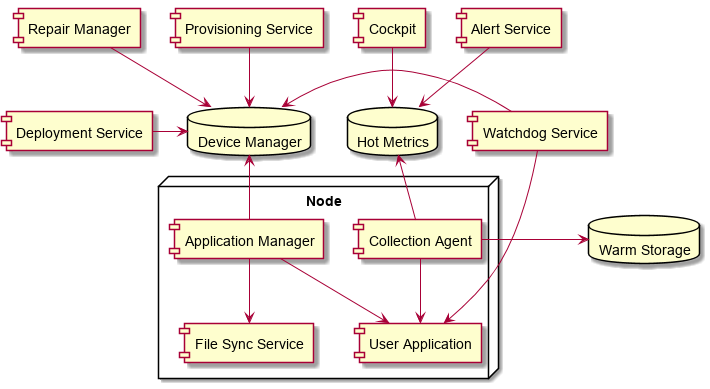
The state of every node in the cluster is recorded by a unified central database called Device Manager. This central database is implemented using the Paxos protocol, provides linearizability guarantees, and usually consists of 5 to 10 machines, similar to ZooKeeper. All components in the cluster depend on the information recorded in Device Manager and do not interact directly with one another. This design fully decouples the components, but it creates a heavy dependency on Device Manager.
On each node, Application Manager performs the main management work:
Communicates with Device Manager to decide which application data should be retained
Downloads the required files through File Sync Service
Starts applications marked as Active
Application and machine state information is collected by Watchdog Service and recorded in Device Manager. Logs and Performance Counters are collected by Collection Agent into hot and cold storage.
Device Manager is the core of the entire cluster. Application Manager is the core of each machine.
Machine Lifecycle Management
This is a "mysterious area" that many software engineers do not understand well, and the paper describes it in some detail. After a machine is inserted into a rack, basic power management can be performed through the control unit built into each rack. Machines can be powered on or off and rebooted remotely without requiring a person to go to the specified location for physical operations. All machines in the cluster are periodically checked by Provisioning Service to identify whether they are newly added machines and whether their basic runtime information is correct, such as the operating system and BIOS version. If necessary, Provisioning Service automatically restarts the machine. When the machine starts, it enters PXE Network Booting, and the specific PXE image to use is determined by Provisioning Service. During this process, it first contacts Device Manager to decide which operation should be completed, and then automatically performs low-level operations such as BIOS upgrades and Reimage.
The image used for Reimage is customized and directly includes the initial Application Manager, File Sync Service, Collection Agent, and other foundational services. After the system starts, it can rely on the regular mechanisms to upgrade and replace application-level components.
Software Lifecycle Management
Because Autopilot was developed by the Bing team, the latency-sensitive nature of online services was considered from the beginning of its construction, making File Sync Service very necessary. The system does not provide direct interfaces such as SAMBA, FTP, RSYNC, or SCP for file transfer. All cross-node operational interactions must go through File Sync Service. This approach has two benefits:
It can effectively avoid impacting online services through throttling, QoS, and similar methods
It can use P2P technology to reduce pressure on the data source
All applications must be built in advance, and the build result becomes a manifest. The paper does not directly describe what it contains, but based on the information mentioned, it can be inferred that it includes at least the following:
Application, data, and configuration files
Application description information, used to determine whether the application is an Always Running service or a periodic task
Strong checksum information for all of the above, used for transfer error detection and manual modification detection
A Manifest has at least two states: disabled and enabled. During its periodic communication with Device Manager, Application Manager learns which Manifests it needs to retain and what their states are. It obtains the required Manifests through File Sync Service, kills applications in the disabled state, and starts applications in the enabled state. Application Manager periodically verifies Manifest integrity and corrects it. This makes it possible to retain multiple versions of an application at the same time for subsequent upgrades or rollbacks. Verifying integrity not only overcomes file corruption caused by TCP’s weak CRC checks and storage errors, but also prevents configuration file drift caused by manual modifications.
The system needs to know the state of machines and applications so it can perform automatic repair, and this is implemented through Watchdog Service. Watchdog Service can be cohosted with the application, deployed entirely on other nodes, or used in a combination of both approaches. Using a separate Watchdog Service allows users to detect application state according to their own application logic. This detection sometimes needs to observe application state from an internal perspective, and sometimes from an external perspective (as a user). Users can define repair logic themselves; otherwise, the system can only perform repair work unrelated to the application’s own logic, namely operations such as Reboot, Reimage, and Replace.
As an application runs, it produces two types of information: logs and Metrics. This information is collected by Collection Agent, routed to different paths according to its access frequency, and connected to alerting or query systems.
Based on the paper’s content, the application deployment process can be inferred as follows:
The user submits a deployment request
The system packages the application into a Manifest based on the request
Deployment Service updates the Manifest information in Device Manager
Deployment Service notifies Application Manager to synchronize data with Device Manager
Application Managers that could not be notified obtain the latest information during their periodic synchronization with Device Manager
After most affected nodes have downloaded the Manifest, they start the deployment process
Deployment Service divides the deployment operation into different stages according to Machine type and Scale unit, and updates Device Manager in sequence
Before each stage is deployed, the affected machines are first set to the Probe state, and then the update is performed
After enough machines in a stage are updated successfully and move from the Probe state to the Normal state, that stage is considered successfully updated; otherwise, rollback is performed in the reverse order of the stages
Other Details
Configuration file updates must also go through the formal deployment process. The benefit is that errors caused by configuration files can also be automatically detected and repaired. Operating system updates are handled similarly.
It is vital to keep checksums of all crucial files
TCP/IP checksums are weak
Computers will spontaneously start running very slowly, but keep making progress
Throttling and load shedding are crucial in all aspects of an automated system
Failure detectors must be able to distinguish between the symptoms of failure and overloading